Showing posts with label TabletPC. Show all posts

Tuesday, August 09, 2011

Updated xinput_calibrator packages

Today I found some time to update the xinput_calibrator packages in my buildservice repository. The new version is 0.7.5. And since someone asked in my last post for 11.4 rpms, I've activated the build also for openSUSE 11.4. 
Feel free to test and report back if you have any trouble with the updated version.

Monday, August 30, 2010

How to calibrate your TabletPC

Since a while e.g. the X11 driver for Wacom tablets should work out of the box, no calibration needed. I didn't test other tablet/touchscreen drivers in the last time, but I assume also some other should work out of the box. But sometimes you still need to calibrate your device.

But how do you calibrate e.g. your wacom tablet on a openSUSE 11.3 or Factory, since there is no wacomcpl anymore in the package, which was used in the past? And how about a evdev based device? Simply use xinput_calibrator. You can get the package for openSUSE from my openSUSE buildservice repo

After installation follow these steps on shell:
# check if xinput_calibrator found any device
user@tablet:~> xinput_calibrator --list
Device "Wacom ISDv4 90 Pen" id=10

# start calib.: for multiple devices use --device option
user@tablet:~> xinput_calibrator
You get this screen, follow the instructions:
You get some output with some instructions as soon as you finished the procedure. The preferred way to setup the tablet/touchscreen with the calibration data is coping a snippet from the output into '/etc/X11/xorg.conf.d/99-calibration.conf' (as root). Here an example for such a snippet:
Section "InputClass"
        Identifier      "calibration"
        MatchProduct    "Wacom ISDv4 90 Pen"
        Option  "MinX"  "0"
        Option  "MaxX"  "28606"
        Option  "MinY"  "0"
        Option  "MaxY"  "17876"
EndSection
You may need to restart your X-server after setting up the file. If it doesn't work checkout the instructions in the output for other ways to setup the changes.
Tech Tags:

Tuesday, March 03, 2009

TabletPCs: fix eraser detection in xournal

Some weeks ago I got a bugreport for SUSE about problems with automatic eraser detection of Wacom tablets/TabletPCs in xournal. After taking a deeper look into the problem, I discovered that it's again a problem with the naming of the wacom input devices in the xorg.conf.

To find out if the eraser is used, xournal checks for GDK_SOURCE_ERASER. And as it looks GDK can only identify an input device as GDK_SOURCE_ERASER if the devicename starts with eraser. But this is not the case at SUSE products since we use SaX2 which use Mouse[*] as device name.

I wrote a patch for xournal to use xsetwacom to find out if the currently used input device is a eraser, so that the automatic detection is working again and you can use the eraser without selecting the eraser tool again and again. You can find updated xournal packages for openSUSE/SLED in my OSBS repo.

In my opinion the real problem is, that there is (AFAIK) currently no way do mark and identify input devices in X.org as e.g. stylus/eraser/touch. It would make it much easier for applications if there would be a device name independent solution in X in the future.
Tech Tags:

Wednesday, September 03, 2008

TabletPCs: more machines in SaX2 (2)

I've added again some more TabletPCs (or UMPCs) to SaX2. These machines are now also supported:
  • Asus R2H (should also cover R2Hv, extended udev rules for this machine to create the /dev/input/evtouch_event link)
  • Gateway CX2724
  • HP Compaq TC1100 (I'm not sure if this will work out of the box. There are only some years old reports for the machine and I'm not sure if the special initialization of the wacom device is still needed or if it now may will work out of the box with a recent kernel. If there is a user with such a machine (and may a openSUSE 11.0) please contact me.)
  • Samsung Q1
  • OQO 02
Packages (x11-input-evtouch and SaX2) for openSUSE as always from here.
Tech Tags:

TabletPCs: fixes for linuxwacom

After updating the linuxwacom package in my openSUSE Build Service repo to 0.8.1-4 I run some test to check if everything is working. It wasn't. The detection of X wacom input devices, which aren't strictly named stylus/cursor/pad/touch, was broken again. As my last patch for this issue was included to the linuxwacom package upstream, there was the problem, that only some distributions package the xf86config lib (why ever). To solve this the package was changed to use the new code only if xf86config is available, but as I now noticed the code was wrongly ifdef'ed. This patch fixes it.

I've send my udev patch for the wacom input devices upstream. Unfortunately the patch isn't included yet. I added fixed/updated udev packages to my repo, but now I decided to remove these RPMs from my repo. I extended the udev rule file of the wacom package instead, since this is easier to maintain. You can find the new udev file here.

You can download/install the updated wacom packages (wacom-kmp and x11-input-wacom*) for openSUSE as always from here.

Friday, August 29, 2008

TabletPCs: new machines and fixes for SaX2

I decided to put the TabletPC related stuff I did the last days into a openSUSE Hackweek project. You can find the whole description of the idea/project at idea.opensuse.org.

So what did I on the last day of Hackweek?
  • Fixed the x11-input-evtouch package to install also the udev rules, which create for the touchscreen devices /dev/input/evtouch_event. Added another machine (IDEACO IDC 6680) to the list of rules (see patch).
  • Fixed SaX2 to handle also the ports/device paths of touchscreens correctly. Now SaX2 can also set /dev/ttyS{2,3} correctly and accepts /dev/input/{elo,evtouch_event,touchscreen} as paths.
  • Moved some existing TabletPC with touchscreens from the Tablet section to the Touchscreen section of SaX2.
  • Changed SaX2 to set now for all Wacom based TabletPCs the option "Button 2" "3". This enable the right mouse button for the Pen/Stylus button, which is much more practical than the default setting of the wacom driver.
And I added again some more machines:
  • Clevo TN120R (a.k.a Nexoc Osiris S621) (evtouch)
  • Gateway C-120X (should be identical to E-155C)
  • Gateway C-140X/E-295C
  • Gateway C210X (should be identical to M280E)
  • HP Compaq 2710p (which should also work for the upcoming 2730p)
  • Samsung Q1-Ultra (evtouch)
You can find the updated packages (evtouch and SaX2) in my Build Service repo and the patches here.

Thursday, August 28, 2008

TabletPCs: more machines in SaX2

Today I added again some more TabletPCs to SaX2. With my patches SaX2 and openSUSE now supports also these machines:
  • Gateway E-155C (thanks Ping Cheng for the data)
  • HP TC4400
  • LG C1
  • LG LT20 Tablet PC
  • Panasonic Toughbook CF-18
  • Toshiba Portégé M series Tablet PC
  • Toshiba Satellite R15/R20
  • Toshiba Tecra M series Tablet PC
You can get the update SaX2 package as always from here. Let me know if you have a machine which isn't listed yet (send your xorg.conf, lshal output and if needed also calibration data/info) and I add your device to the database.

Wednesday, August 27, 2008

TabletPCs: HP Pavilion tx2000/tx2100/tx2500 support

Today I've extended SaX2 to support also the Touch devices of the Wacom USB TabletPCs since the touch input devices have now persistent /dev/input/by-id links (see my last post). My SaX2 version supports now these new machines:
  • HP Pavilion tx2000 series [2]
  • HP Pavilion tx2100 series [2]
  • HP Pavilion tx2500 series [1]
  • generic Wacom USB TabletPC (added touch device to existing entry) [3]
You can get my SaX2 package for openSUSE 10.2/10.3/11.0/Factory from my Build Service repo (be sure that you also update udev from my repo). As soon as the patches for udev are gone upstream also the SaX2 patches go into the upstream repo.

Let me know if you have any problems with the new entries on these machines. If you e.g. still need to calibrate the input devices manually tell me the BottomX/Y and TopX/Y values and I update SaX2.

Tuesday, August 26, 2008

Wacom USB TabletPCs: persistent by-id links

Since the linuxwacom package supports TabletPCs with USB tablets we have the problem to find the correct devices under /dev/input/* for the xorg.conf settings. While the input device of the stylus was easy to find (/dev/input/by-id/usb-Tablet_ISD-V4-event-mouse) but strange named, the input device file for the touch device needed to be searched by the user since there was no persistent link under /dev/input/by-id/ that would allow to use the same link for all USB based Wacom TabletPCs.

Now I've found a way to change udev to set also a persistent by-id link for the touch device. I also change the naming of the link to the stylus device. With my patch you get now these links under /dev/input/by-id/ :
tux@linux:/ # ls /dev/input/by-id/
usb-Tablet_ISD-V4-event-stylus
usb-Tablet_ISD-V4-event-touch
usb-Tablet_ISD-V4-stylus
usb-Tablet_ISD-V4-touch
The input devices you needed for you xorg.conf are the *-event-* links.

If you use openSUSE you can get patched udev versions from my buildservice repo. I've patched also SaX2 to handle the new link names (packages see here). Note: you need SaX2/udev to get everything working correctly and you may need to run SaX2 to update your actual X configuration.

Saturday, August 09, 2008

aKademy 2008 started

I (or we, since there are 8 SUSE developer here) arrived yesterday at Mechelen (Belgium) for the Akademy 2008 (from 9. to 15. August in Sint-Katelijne-Waver). Today the Akademy was opened and there where already some really interesting talks as the keynote ('KDE Community websites: The past, the present and a vision for the future'), 'Future of the KDE Development Model', 'Akonadi Unleashed', 'Deepening KDE and Qt collaboration' or 'Qt on Maemo'.

Thuesday is the 'Embedded and Mobile Day' with interesting talks about QT and KDE on Maemo. I have to ask there the Nokia/maemo people about the handwrite recongnition (HWR) on the N810. I couldn't find yet any usefull information about the backend which do the recognition. Currently there is no good free HWR for Linux TabletPCs available (except maybe Cellwriter, which support grid-entry based input, but no natural writing). It would be really cool if Nokia would share the HWR so that TabletPCs under Linux could get more usable than currently.
Tech Tags:

Friday, August 01, 2008

TabletPC: ASUS R1E/R1F support

I added support for two USB Wacom based TabletPCs from ASUS, the R1E and the R1F, to SaX2 ([1]). Unfortunately SaX2 wasn't able to handle the "Device" correctly, neither /dev/input/wacom nor /dev/input/by-{id,path}/* was excepted by SaX2 also if it was correctly set in the config database entry. The input device path was always set back to /dev/input/event0 and not only TabletPC where affected. I fixed it with a patch ([2]) to extend the existing path checks.

While fixing the USB device paths I also discovered a problem with the serial (/dev/ttyS*) device paths while testing the existing entry for the HP tc4200 which needs to use COM-3 (/dev/ttyS2). The device was always set to /dev/ttyS1. Fixed also this problem with a patch ([3]) for SaX2.

Additionally I've extended the existing generic 'Wacom ISDV4 TABLET PC (SERIAL)' entry to support also Touch devices and added a new generic entry for TabletPCs with USB Wacom devices [4].

You can find an updated SaX2 version (including all patches) for openSUSE 10.2-Factory in my repo.
Tech Tags:

Thursday, July 31, 2008

TabletPCs: support for WACOM USB Tablets

Great news: the linuxwacom package supports now also TabletPCs with internal USB WACOM tablet devices. This means there is now support for e.g. the ASUS R1F or the Hewlett-Packard tx2000z/tx2130ea/tx2500z.

To get the tablet supported you need a new version of the wacom kernel module. I've added a new wacom-kmp package to my openSUSE Build Service project with an updated version of the module including a working version for kernel 2.6.26. The package is available for openSUSE 10.2/10.3/11.0 and factory. You should also update x11-input-wacom to the latest version from the same repo.

Currently I'm working on an updated and extended version of SaX2 to easily configure also these TabletPCs. As soon as I've a new SaX2 package available I'll announce it here.
Tech Tags:

Friday, July 25, 2008

Lenovo ThinkPad X61t Touch support

As I already wrote in the last post the linuxwacom driver now works with Touch devices as used in the Lenovo ThinkPad X61t. Today I tried to use the touch device, but unfortunately it's not full working with default settings as the other wacom input devices on TabletPCs. By default you can only use a part of the screen, the cursor never reaches the last 2-3 cm to the border of the screen.

I tried to calibrate the device with wacomcpl but I got alway an error. The reason was that wacomcpl wrongly detected all wacom input devices as core devices. I had to fix wacomcpl first, you can find the patch here.

Sadly also the fixed version of wacomcpl wasn't able to calibrate the touch device correctly. The touch device get active as soon as you hit the display with you finger or a non-EMR pen. This get interpreted by wacomcpl as click, you don't have a chance to put the cursor on the cross to get a value for calibration. Because of this I played around with xsetwacom and the ButtomX/Y and TopX/Y options on the X61t. Here the values I added to my SaX2 version to get the device usable:
Option "BottomX" "915"
Option "BottomY" "950"
Option "TopX" "48"
Option "TopY" "79"
I hope this make the X61t now usable. You can get updated SaX2 and x11-input-wacom packages here. But it would be nice if the autocalibration in the driver could get fixed including wacomcpl.

Thursday, July 24, 2008

openSUSE: Better TabletPC support

Since a while some newer TabletPCs uses Wacom Tablets with Multitouch support which allows to use the Tablet with the pen but also with your fingers as a Touchscreen. One example is the Lenovo ThinkPad X61t.

The linuxwacom X11 driver now also provides touch support. It's realised as a new input device with option "Type" "touch". These devices work only on TabletPCs and with the option "ForceDevice" "ISDV4".

Since SaX2 currently only supports the configuration of the Stylus (Pen) and the Eraser devices I had to extend Sax2 to allow also the configuration of Touch devices. You can find my patch here and an updated SaX2 package (for openSUSE >= 10.2) in my openSUSE Build Service home repo (you need also the latest x11-input-wacom packages from there to get the full support).

Here a screenshot of the new 'Electronic Pens' tab of SaX2 from a Lenovo X61t:

If you have an other TabletPC with Wacom Multitouch support feel free to send me an email with your xorg.conf and some information about the machine and I add the machine to SaX2, so that you be able to configure your machine very easily.
Tech Tags:

Friday, June 13, 2008

TabletPCs: fix for xsetwacom

We had some trouble with rotation of wacom input devices on openSUSE 10.3/11.0 (see bugs #387127, #399016 and #391466) if the screen content get rotated via the XRandR extension.

The source of the problem was the way 'xsetwacom --list' try to identify the configured wacom input devices. The tool try to find them based on the device name (Identifier in xorg.conf) which don't work if you set other names than cursor, stylus, eraser or pad. But this is what SaX2 do if you configure a Tablet, they get named 'Mouse[x]'. Because of this (the patched version of) krandrtray (KDE) and resapplet (GNOME) were no longer able to find the devices which need to get rotated with xsetwacom.

To solve the problem I ported and extended an old patch from Stefan Dirsch from 2005 to the current package/source. With this patch xsetwacom now check the xorg.conf for devices which uses the wacom driver and check then the Type field/option for the device type.

The upcoming openSUSE 11.0 contains the patch already. For older openSUSE releases you can find updated packages in my openSUSE build service repository. All other people can get the patch for v0.7.9 and v0.8.0 of linuxwacom here.
Tech Tags:

Tuesday, November 06, 2007

TabletPCs: Cellwriter

Recently I found a new cool tool for TabletPCs: Cellwriter. The developer describe it as 'a grid-entry natural handwriting input panel' and it reminds me to the input panel on the Windows XP TabletPC Edition.
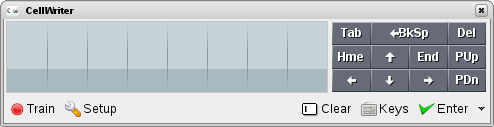
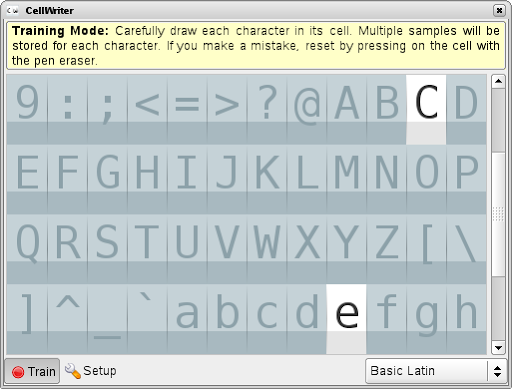
It provides a way to enter text by write characters with a pen to a grid. The big advantage in comparison with e.g. tools like xstroke is: there are no limitation for the way you write a character. You can take off the pen for one character and write points or an other line. This allows to write all characters of Unicode (e.g. German umlauts or chinese). As first you have to train the tool to correctly recognize your input. For this you can use the 'Train'-dialog where you should write each char five times into the related grid.
After the user trained CellWriter, he can use it to simple input text, commands or whatever to any desktop application that has the focus. Cellwriter show as applet e.g. in the KDE Panel and can get hide/shown via click on the applet icon. You can place the window free on the desktop or dock it to Top or Bottom of the screen. The input dialog allows also to correct wrong recognized input or to simply delete input. If you finished, simply press enter to send the text to the application with the input focus.

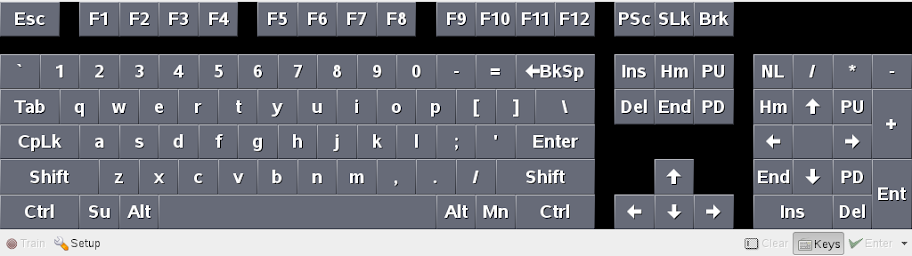
If you prefer to enter text via a virtual keyboard, CellWriter has also a solution for this. Simply press on the Keys icon and you get a virtual keyboard. Unfortunately this works for me only if the window is docked to the screen, but I assume it is a bug. There is also some more room for improvement: I could not find a way to configure the layout of the virtual keyboard, it was always US.

Cellwriter is a relative young project. The Changelog show the initial package is from end of August 2007. But it is a great tool and work well, also if there is some room for improvements:

  • The user need to train the tool before use the first time. It would be useful to have a basic pre-trained mode, which would allow the user to simply use it from the first start (at least for basic Latin characters).
  • The keyboard need to get fixed (see above) and should support configurable key maps.
  • If CellWriter is docked it should simply roll itself up if the focus get lost (like yakuake). If Cellwriter is in not docked the window is unfortunately always on top, thats annoying.
  • It would be cool if Cellwriter would detect input areas automatically and would show a icon besides this area to pop-up the input window. Not sure if this is that simple or if this need some changes in the desktop environments, but it should be IMO possible.

Conclusion: Cellwriter is a great tool, I like it. It allows TabletPC users to get basic, but natural handwrite recognition. Simply forget xstroke, this tool is very much powerful. I have already packaged it for openSUSE 10.2, 10.3 and Factory. You can get the packages from my repository. Feel free to install and use it. We plan to add the package to the next openSUSE release.

Tech Tags:

Tuesday, June 19, 2007

FujitsuSiemens TabletPC button module

There is, since some months, a new project to support the buttons of Fujitsu Siemens TabletPCs (T- and P-series machines with FUJ02bf pnp devices) including the 'Application Panel'. The project called fjbtndrv provide a kernel module to get the tablet button and the brightness key events via the input layer (/dev/input/event*).

Additionally, and this is IMO the best, the module catch the tablet rotation event from convertible FSC TabletPCs. This allow us now to detect the state of the tablet (open/rotated-closed) and react on the event e.g. in KDE via KRandRTray and rotate the screen. Together with IBM/Lenovo we have now a way for machines of two major manufacturers to go a step forward with TabletPCs.

I packaged a KMP rpm for openSUSE 10.3/factory. You can download the rpm (fsc_btns-kmp) as always from my home project in the openSUSE build service. The package get later included into the SUSE distribution.

What are my next planed steps to improve TabletPC support?
  1. extend the wacom X.org driver to rotate automatically with XRandR extension
  2. extend KRandRTray to:
    • get rotation events
    • get events from rotate hotkeys
    • allow the user to configure if and how to rotate the screen on these events
Tech Tags:

Monday, May 21, 2007

Fujitsu P-Series tablet driver

Since SLE10/SUSE 10.1 SaX2 supports to configure the touchscreen of the Fujitsu Siemens P-Series Tablet PCs. Unfortunately the needed driver for the X server wasn't free available at this time IIRC.

Some weeks ago I added a repackaged version (merged libtouch code from the evtouch driver and added the code to a working autotool package) of the fujitouch driver (v0.6.3) for openSUSE 10.2/10.3 to my home project at the openSUSE build service which work with Xorg 7.2. Unfortunately I had no access to a p-series machine, but I got contact to a user with a P1610 which helped with testing to get the package basically working (only rotation via tools like KRandRTray didn't work).

Now there is a new version 0.6.4 which support automatically rotation via the XRandR extension and which use the same package structure as my version of 0.6.3. You can find RPMs (including some patches to build correct) for SUSE here, feel free to install and report problems via the Novell Bugzilla. The package get merged into the SUSE distributions as soon as the driver work as expected.
Tech Tags:

Tuesday, March 13, 2007

SUSE Tablet PC support

In the last week I worked on better Tablet PC support for SUSE Products. Her now some infos about the progress:
  • I packaged a special 'SaX2 Tablet PC Edition' (available for SLE10/10.2/10.3) which fix the existing Tablet PC support and provides now more support in for Tablet PCs in the Tablet section than the normal sax version (IBM X41, ACER TM C300/C301/C302 series, Fujitsu Lifebook T series (T3010/T4010), HP Compaq TC4200, Motion M1200 and M1400 and general Wacom Tablet PCs). Feel free to download and install, but also to report your special settings for other machines to me.
  • Added a updated version of the wacom input driver (for SLE10/10.2/10.3), Jarnal and Xournal to my home project.
  • Getting a Gateway M280e Tablet PC running. This machine use a Finepoint tablet instead of a Wacom device. You need the x11-input-fpit driver to be able to use the tablet. I added a package for openSUSE 10.2 to my home project at the openSUSE Buildservice, for openSUSE Factory/10.3 the x11-input-driver package should be up-to-date and contain a working version of the fpit-driver. To setup the device on 10.2 you need to install setserial and call this as root on command line:
    setserial /dev/ttyS0 port 0x03F8 irq 4 baud_base 38400
    For factory/10.3 this should happen automatically via HAL (a updated HAL version for 10.2 will follow the next days). To configure your X-Server you should download and install my 'SaX2 Tablet PC Edition' where you can simply select the Finepoint device in the Tablet section.
Tech Tags:

Friday, January 19, 2007

KDE Tablet PC support

One of problems with Tablet PCs under Linux is lacking support for small, but very essential features as the Windows XP Tablet PC Edition provide. There are already drivers for machines with e.g. Wacom tablets or some Fujitsu Siemens (FSC) devices and also some applications as Xournal, Jarnal or xstroke which provide useful features.

On SUSE there is also support in SAX to configure Wacom and FSC devices and I already wrote a patch for HAL (v0.5.8/git) to detect Tablet PCs and set the needed Ports correct and automatically. There is also a patch for XDM to show xvkbd on login and a patch for KDE to show xvkbd on the unlock dialog from Lubos Lunak.

But until now one feature was missing: The user could rotate the screen via KRandr and also the Wacom driver support already rotation but there was no way to do this together because the Wacom driver did not support the XRandR extension. The user had to call xsetwacom to rotate also the input devices to use rotation. Thanks to Stephan Binner the user can now rotate the screen and the input devices together via KRandr and it work like a charm. You can find the patch here.
Tech Tags: