Recently I found a new cool tool for TabletPCs: Cellwriter. The developer describe it as 'a grid-entry natural handwriting input panel' and it reminds me to the input panel on the Windows XP TabletPC Edition.
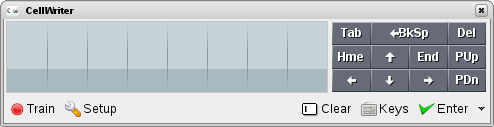
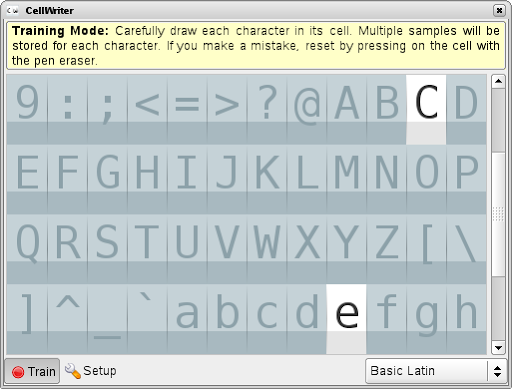
It provides a way to enter text by write characters with a pen to a grid. The big advantage in comparison with e.g. tools like xstroke is: there are no limitation for the way you write a character. You can take off the pen for one character and write points or an other line. This allows to write all characters of Unicode (e.g. German umlauts or chinese). As first you have to train the tool to correctly recognize your input. For this you can use the 'Train'-dialog where you should write each char five times into the related grid.
After the user trained CellWriter, he can use it to simple input text, commands or whatever to any desktop application that has the focus. Cellwriter show as applet e.g. in the KDE Panel and can get hide/shown via click on the applet icon. You can place the window free on the desktop or dock it to Top or Bottom of the screen. The input dialog allows also to correct wrong recognized input or to simply delete input. If you finished, simply press enter to send the text to the application with the input focus.
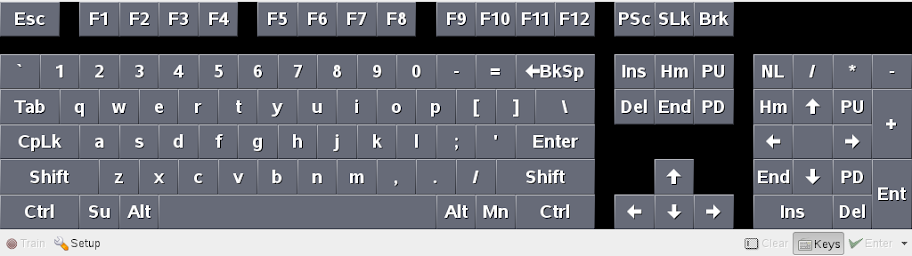
If you prefer to enter text via a virtual keyboard, CellWriter has also a solution for this. Simply press on the Keys icon and you get a virtual keyboard. Unfortunately this works for me only if the window is docked to the screen, but I assume it is a bug. There is also some more room for improvement: I could not find a way to configure the layout of the virtual keyboard, it was always US.
Cellwriter is a relative young project. The Changelog show the initial package is from end of August 2007. But it is a great tool and work well, also if there is some room for improvements:
- The user need to train the tool before use the first time. It would be useful to have a basic pre-trained mode, which would allow the user to simply use it from the first start (at least for basic Latin characters).
- The keyboard need to get fixed (see above) and should support configurable key maps.
- If CellWriter is docked it should simply roll itself up if the focus get lost (like yakuake). If Cellwriter is in not docked the window is unfortunately always on top, thats annoying.
- It would be cool if Cellwriter would detect input areas automatically and would show a icon besides this area to pop-up the input window. Not sure if this is that simple or if this need some changes in the desktop environments, but it should be IMO possible.
Conclusion: Cellwriter is a great tool, I like it. It allows TabletPC users to get basic, but natural handwrite recognition. Simply forget xstroke, this tool is very much powerful. I have already packaged it for openSUSE 10.2, 10.3 and Factory. You can get the packages from my repository. Feel free to install and use it. We plan to add the package to the next openSUSE release.